فلسطين

اختيار المنطقة


اختيار اللغة

عربي EN


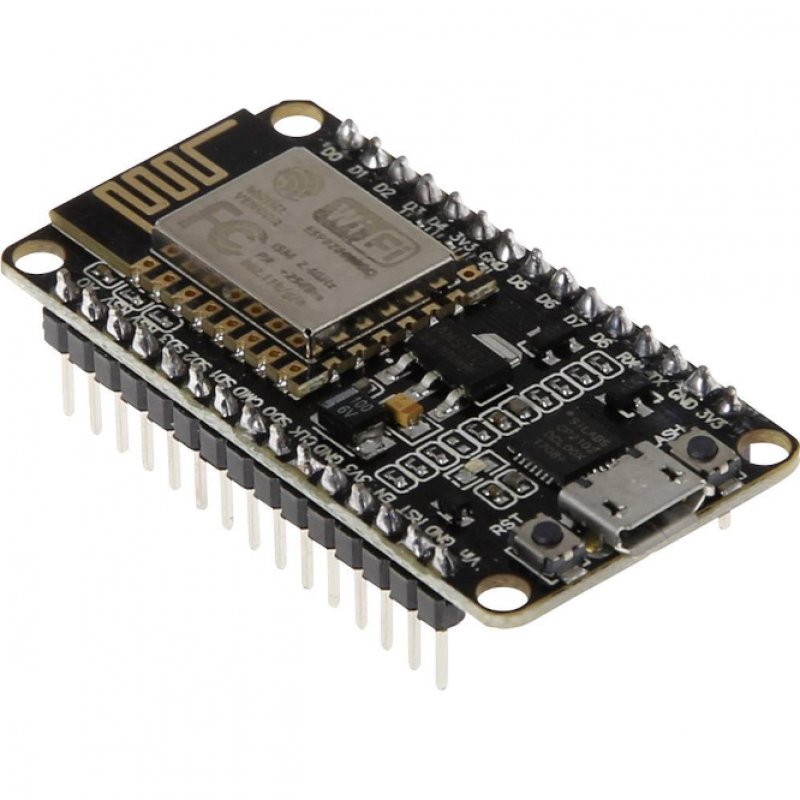
ESP8266 NodeMCU

NodeMCU is an open source firmware for which open source prototyping board designs are available. The name "NodeMCU" combines "node" and "MCU" (micro-controller unit).


22 ₪

الناشر: ⚡ Electronic Store ⚡

القسم: NodeMCU & Controller

تاريخ النشر: 2021-02-03


install to arduino IDE

كيفية تثبيت القطعة على برنامج الاردوينو

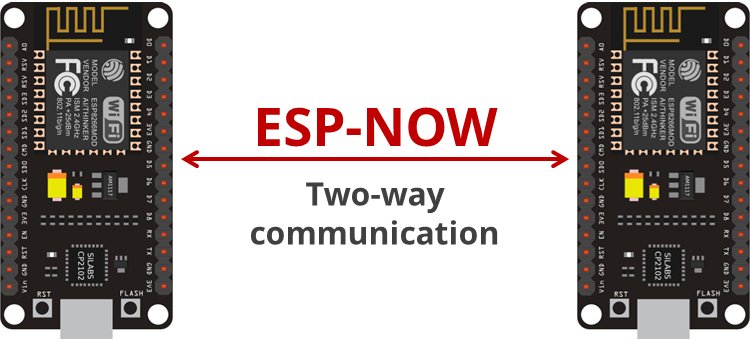
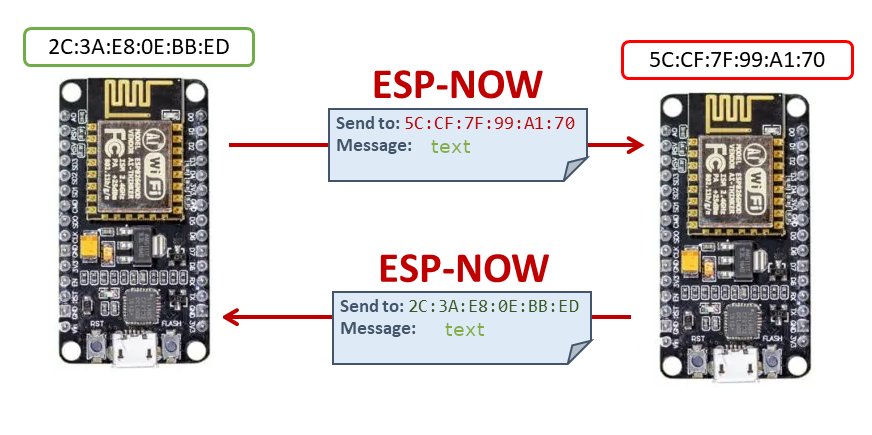
ESP-NOW communication protocol

establish a two-way communication between two ESP8266 NodeMCU boards


This without using Wi-Fi

This protocol enables multiple devices to talk to each other without using Wi-Fi. This is a fast communication protocol that can be used to exchange small messages (up to 250 bytes) between ESP32 boards. ESP-NOW is very versatile and you can have one-way or two-way communication in different arrangements.


Getting the Boards MAC Address

code
نسخ
اقتباس
عرض
تنزيل
	
								
#include <ESP8266WiFi.h> String mac; void setup() { Serial.begin(115200); WiFi.mode(WIFI_STA); mac = WiFi.macAddress(); Serial.println(mac); } void loop() { Serial.println(mac); delay(2000); }


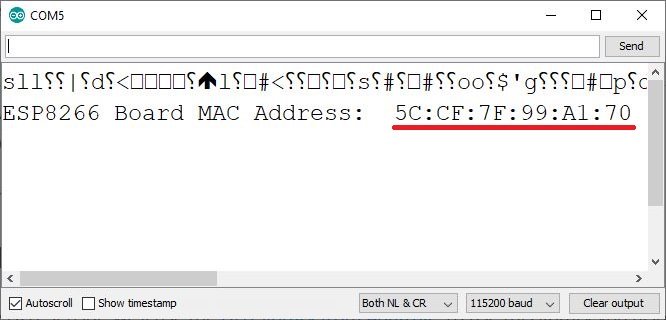
After uploading the code, press the RST/EN button, and the MAC address should be displayed on the Serial Monitor.


ESP1 code to send and receive from ESP2

code
نسخ
اقتباس
عرض
تنزيل
	
								
/* esp1 using espnow */ #include <ESP8266WiFi.h> #include <espnow.h> // REPLACE WITH THE MAC Address of your receiver uint8_t broadcastAddress[] = {0x94, 0xB9, 0x7E, 0x13, 0x98, 0xC3}; // Define variables to store incoming readings float incoming_val1; char incoming_val2[16]; // Updates DHT readings every 10 seconds const long interval = 10000; unsigned long previousMillis = 0; // will store last time DHT was updated // Variable to store if sending data was successful String success; //Structure example to send data //Must match the receiver structure typedef struct struct_message { float val1; char val2[16]; } struct_message; // Create a struct_message called struct_to_send_msg to hold sensor readings struct_message struct_to_send_msg; // Create a struct_message to hold incoming sensor readings struct_message struct_to_receive_msg; // Callback when data is sent void OnDataSent(uint8_t *mac_addr, uint8_t sendStatus) { Serial.print("Last Packet Send Status: "); if (sendStatus == 0){ Serial.println("Delivery success"); } else{ Serial.println("Delivery fail"); } } // Callback when data is received void OnDataRecv(uint8_t * mac, uint8_t *incomingData, uint8_t len) { memcpy(&struct_to_receive_msg, incomingData, sizeof(struct_to_receive_msg)); Serial.print("Bytes received: "); Serial.println(len); incoming_val1 = struct_to_receive_msg.val1; memcpy(&incoming_val2, &struct_to_receive_msg.val2, sizeof(struct_to_receive_msg.val2)); } void printstruct_to_receive_msg(){ // Display Readings in Serial Monitor Serial.println("INCOMING READINGS"); Serial.print("val1: "); Serial.println(incoming_val1); Serial.print("val2: "); Serial.println(incoming_val2); } void setup() { // Init Serial Monitor Serial.begin(115200); // Set device as a Wi-Fi Station WiFi.mode(WIFI_STA); WiFi.disconnect(); // Init ESP-NOW if (esp_now_init() != 0) { Serial.println("Error initializing ESP-NOW"); return; } // Set ESP-NOW Role esp_now_set_self_role(ESP_NOW_ROLE_COMBO); // Once ESPNow is successfully Init, we will register for Send CB to // get the status of Trasnmitted packet esp_now_register_send_cb(OnDataSent); // Register peer esp_now_add_peer(broadcastAddress, ESP_NOW_ROLE_COMBO, 1, NULL, 0); // Register for a callback function that will be called when data is received esp_now_register_recv_cb(OnDataRecv); } void loop() { unsigned long currentMillis = millis(); if (currentMillis - previousMillis >= interval) { // save the last time you updated the DHT values previousMillis = currentMillis; //Set values to send struct_to_send_msg.val1 = 1111.0; strncpy(struct_to_send_msg.val2, "hello from ESP1", sizeof(struct_to_send_msg.val2)); // Send message via ESP-NOW esp_now_send(broadcastAddress, (uint8_t *) &struct_to_send_msg, sizeof(struct_to_send_msg)); // Print incoming readings printstruct_to_receive_msg(); } }


ESP2 code to send and receive from ESP1

code
نسخ
اقتباس
عرض
تنزيل
	
								
/* esp2 using espnow */ #include <ESP8266WiFi.h> #include <espnow.h> // REPLACE WITH THE MAC Address of your receiver uint8_t broadcastAddress[] = {0x94, 0xB9, 0x7E, 0x14, 0x59, 0xE7}; // Define variables to store incoming readings float incoming_val1; char incoming_val2[16]; // Updates DHT readings every 10 seconds const long interval = 10000; unsigned long previousMillis = 0; // will store last time DHT was updated // Variable to store if sending data was successful String success; //Structure example to send data //Must match the receiver structure typedef struct struct_message { float val1; char val2[16]; } struct_message; // Create a struct_message called struct_to_send_msg to hold sensor readings struct_message struct_to_send_msg; // Create a struct_message to hold incoming sensor readings struct_message struct_to_receive_msg; // Callback when data is sent void OnDataSent(uint8_t *mac_addr, uint8_t sendStatus) { Serial.print("Last Packet Send Status: "); if (sendStatus == 0){ Serial.println("Delivery success"); } else{ Serial.println("Delivery fail"); } } // Callback when data is received void OnDataRecv(uint8_t * mac, uint8_t *incomingData, uint8_t len) { memcpy(&struct_to_receive_msg, incomingData, sizeof(struct_to_receive_msg)); Serial.print("Bytes received: "); Serial.println(len); incoming_val1 = struct_to_receive_msg.val1; memcpy(&incoming_val2, &struct_to_receive_msg.val2, sizeof(struct_to_receive_msg.val2)); } void printstruct_to_receive_msg(){ // Display Readings in Serial Monitor Serial.println("INCOMING READINGS"); Serial.print("val1: "); Serial.println(incoming_val1); Serial.print("val2: "); Serial.println(incoming_val2); } void setup() { // Init Serial Monitor Serial.begin(115200); // Set device as a Wi-Fi Station WiFi.mode(WIFI_STA); WiFi.disconnect(); // Init ESP-NOW if (esp_now_init() != 0) { Serial.println("Error initializing ESP-NOW"); return; } // Set ESP-NOW Role esp_now_set_self_role(ESP_NOW_ROLE_COMBO); // Once ESPNow is successfully Init, we will register for Send CB to // get the status of Trasnmitted packet esp_now_register_send_cb(OnDataSent); // Register peer esp_now_add_peer(broadcastAddress, ESP_NOW_ROLE_COMBO, 1, NULL, 0); // Register for a callback function that will be called when data is received esp_now_register_recv_cb(OnDataRecv); } void loop() { unsigned long currentMillis = millis(); if (currentMillis - previousMillis >= interval) { // save the last time you updated the DHT values previousMillis = currentMillis; //Set values to send struct_to_send_msg.val1 = 2222.0; strncpy(struct_to_send_msg.val2, "hello from ESP2", sizeof(struct_to_send_msg.val2)); // Send message via ESP-NOW esp_now_send(broadcastAddress, (uint8_t *) &struct_to_send_msg, sizeof(struct_to_send_msg)); // Print incoming readings printstruct_to_receive_msg(); } }


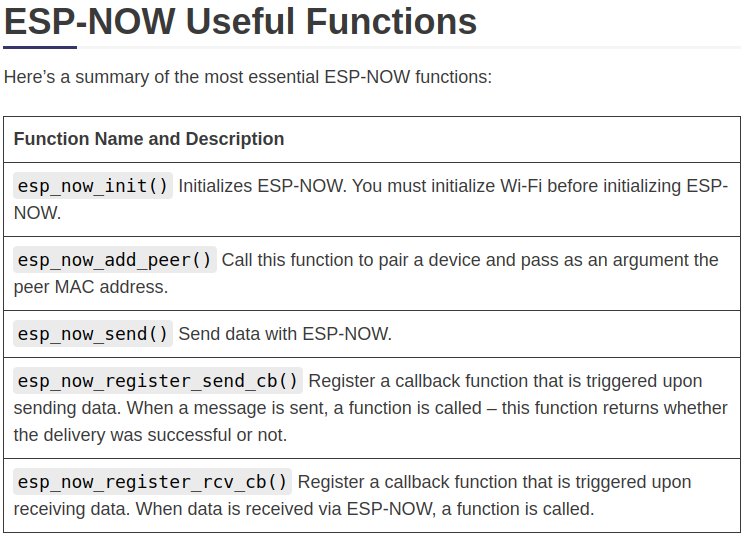
ESP-NOW Useful Functions


تسوق الآن
الشركات
0 السلة
اتصل بنا